
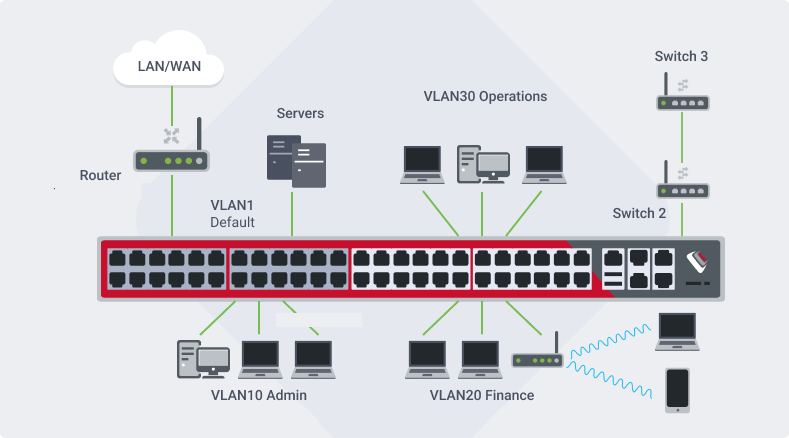
In the security business, no step is too small to ensure safety. Read on to learn how the Virtual Local Area Network (VLAN) can help take your security above and beyond.
What is a Virtual Local Area Network (VLAN)?
A VLAN is a type of Local Area Network (LAN). Normal LANs connect all the devices in a physical area, allowing them to communicate with each other over the network. This can be useful in an office building so all the connected devices on the LAN can share resources like files. However, LANs are limited by physical proximity of the devices, thus making them less useful for, say, multiple security cameras in various buildings across a campus.
The Virtual Local Area Network (VLAN) allows devices to be connected on a virtual network rather than a physical one, thus creating the possibilities for organizational management, security, and control over the traffic on a network. Not only does a VLAN sequester devices on its network from communicating with other networks, it also allows communication between devices in different physical locations, so long as they are connected to the network.
What are the different kinds of VLANs?
Basic VLAN
When a VLAN is created, it is assigned a unique ID which differs from the default LAN and thus separates it from other network(s). When setting up a VLAN with a firewall/router or managed switch, each network is associated with a physical network port by assigning its unique ID number to it. All devices assigned/connected to these ports are segmented for other network traffic.
Extended VLAN
Extended VLAN uses the same basic configuration as the basic, but includes extra features such as priority trafficking, trunking, and spanning trees. Priority trafficking allows the user to configure the VLAN to prioritize traffic from certain devices over others. Trunking allows several VLANs to be combined into one link, allowing communication between them. Spanning trees prevent loops from forming by preventing data from being sent over faulty links. These extra features improve the traffic control, broaden connection between devices on different networks, and prevent the VLAN from experiencing issues.
Tagged VLAN
Tagged VLANs consist of multiple networks, each with a tag to identify it. Each data frame bears the tag of the VLAN it is meant for, which allows it to be forwarded to the correct network by switch access ports. This configuration, while more complex, allows the networks to transmit more data with less congestion.
Why use VLANs?
Segmenting one network into multiple VLANs has many advantages for a widespread variety of businesses. Using these networks as a tool for organizational management allows businesses to group devices by their department; for example, keeping HR separate from other areas such as Accounting. On the other hand, in the healthcare sector, sequestering the flow of patient information to its own VLAN provides extra confidentiality for patients. With each network limited to only relevant devices, control of data traffic also becomes much more manageable, preventing networks from being bogged down with excess data.
In security systems, separating the cameras, access control, and monitoring to a VLAN allows faster flow of information between all these devices. Liquid Video Technologies implements these practices when setting up local networks to further enhance security system connected devices to assure flow of data and isolation. Additionally, they are separate from other networks such as Wi-Fi, making it more difficult for bad actors to access the security system network. And, because the VLAN lacks the physical limitations of the traditional LAN, devices can be connected from various areas. This allows for remote monitoring of the system alongside on-site monitoring, adding extra layers for security.
All in all, the VLAN opens up opportunities for network security, speed, and monitoring that make it a valuable element of security systems. The extra layers of safety and speed allow companies like LVT to guarantee increased quality and peace of mind for their clients. To learn more about the tools and strategies Liquid Video uses to work with clients, visit our website.

Recent Comments